
Table of contents
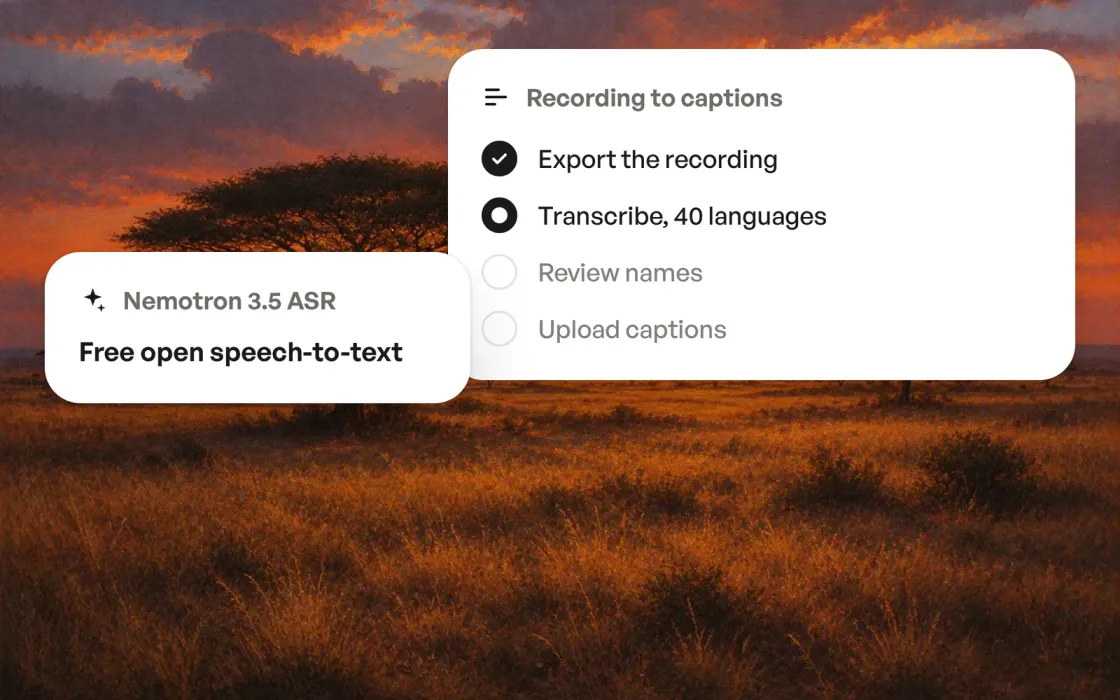
NVIDIA Nemotron 3.5 ASR is a pair of free, open speech-to-text models from NVIDIA: Nemotron 3.5 Transcribe for recorded audio in 40 languages, up to 1 hour long, and a small Nemotron 3.5 ASR streaming model for live audio. I am an AI Marketing Specialist at TestMu AI with 2+ years of multi-channel marketing experience, and I checked NVIDIA's own release pages for every number here.
This post covers what the models are, the October 28 announcement, which model you need, what it means for marketers, how to use it, cost, the Whisper comparison, mistakes and what to watch.
Nemotron 3.5 ASR in 30 seconds
Nemotron 3.5 Transcribe turns a recorded podcast, webinar or video into a transcript with speaker labels, in 40 languages, at no license cost.
- What it is: Nemotron 3.5 Transcribe is an open-weight speech model from NVIDIA that transcribes, labels speakers and translates a recording up to 1 hour long in a single pass.
- What it costs: The model weights are free under the OpenMDW-1.1 license, so your only cost is the GPU time or the hosted endpoint that runs them.
- Who it is for: Podcast producers, webinar teams and video marketers who publish captions, show notes or multilingual clips get the most from Nemotron 3.5 Transcribe.
- Where I would use it: I work on YouTube and newsletter content, so a free transcript with speaker labels is the first step I would add before any human review.



Free AI Product Marketing Playbook to advance your career
Thanks. Your copy of the playbook is ready.
Download the PDFWhat is NVIDIA Nemotron 3.5 ASR?
NVIDIA Nemotron 3.5 ASR is NVIDIA's current family of open speech-to-text models, released with their weights so anyone can download and run them. Speech-to-text, also called ASR (automatic speech recognition), is software that listens to audio and writes the spoken words as text.
- Nemotron 3.5 Transcribe: Nemotron 3.5 Transcribe (full name NVIDIA-Nemotron-3.5-Transcribe-30B-A4B) is the large model for recorded audio, a speech encoder joined to a hybrid mixture-of-experts language model with about 4.3B active parameters.[1]
- Nemotron 3.5 ASR streaming: Nemotron 3.5 ASR streaming 0.6B is the small model for live audio, a multilingual streaming ASR model that processes speech in short chunks as it arrives.[2]
Nemotron 3.5 Transcribe and the streaming model both ship under the OpenMDW-1.1 license.[3]
OpenMDW-1.1 is an open license for model weights, and NVIDIA marks the Transcribe model as ready for commercial or non-commercial use.[1]
What did NVIDIA announce on October 28?
On October 28, 2026, NVIDIA released Nemotron 3.5 Transcribe with open weights on Hugging Face, together with Granary v2, the public speech dataset behind it.[4]
- One model, several jobs: A single Nemotron 3.5 Transcribe model performs verbatim, written-form, contextual, speaker-attributed and rich transcription, plus speech translation and spoken language identification.[3]
- 40 languages and 1-hour recordings: Nemotron 3.5 Transcribe identifies spoken language in 40 languages, on recordings up to 1 hour long.[3]
- Up to 8 speakers: Nemotron 3.5 Transcribe labels up to 8 speakers in a recording, so a panel webinar comes back with each line attributed.[4]
- Top open model for English accuracy: NVIDIA reports a mean word error rate (the share of words a model gets wrong) of 4.71% across the 9 public test sets of the English Open ASR Leaderboard.[3]
- Granary v2: Granary v2 is the public training dataset released with the model, with a manifest of 463,062 hours of speech across 48 languages and 16 source corpora.[4]
Nemotron 3.5 Transcribe vs Nemotron 3.5 ASR streaming: which one do you need?
Pick Nemotron 3.5 Transcribe for anything already recorded, and Nemotron 3.5 ASR streaming only for live audio such as the caption feed of a live webinar.
- Audio type: Nemotron 3.5 Transcribe is built for recorded audio, not live streaming, while the streaming model works on audio chunk by chunk as it arrives.[4]
- Size: Nemotron 3.5 Transcribe is a 30B-class model with about 4.3B active parameters, and the streaming model has 0.6B parameters, so the streaming model runs on far less hardware.
- Extras: Nemotron 3.5 Transcribe adds speaker labels, translation and context prompts, while the streaming model is a plain transcription model built for low delay.
- Marketing fit: Podcasts, webinar replays and video captions are recorded, so Nemotron 3.5 Transcribe is the model for nearly every marketing job, and live captions at a virtual event are the streaming model's job.
| Nemotron 3.5 Transcribe | Nemotron 3.5 ASR streaming | |
|---|---|---|
| Audio type | Recorded audio, up to 1 hour per file | Live audio, processed chunk by chunk as it arrives |
| Size | 30B-class model, about 4.3B active parameters | 0.6B parameters, runs on far less hardware |
| Extras | Speaker labels, translation and context prompts | Plain transcription built for low delay |
| Marketing fit | Podcasts, webinar replays and video captions | Live captions at a virtual event |
What does NVIDIA Nemotron 3.5 ASR mean for marketers?
NVIDIA Nemotron 3.5 ASR means the transcript step of podcast, webinar and video work is now free at the model level, with speaker labels and translation included.
- Podcasts: A 1-hour episode fits inside the model's limit, so one pass returns a speaker-labeled transcript for show notes, pull quotes and a blog draft.[1]
- Webinars: A recorded webinar with a host, 2 panelists and a moderator comes back with each speaker tagged, which turns pulling a quote for LinkedIn into a text search instead of a re-listen.
- Video captions: Captions for YouTube and course videos start from the written-form transcript, and 40-language coverage means one tool for every market you publish in.
- Vocabulary control: Text context can supply task instructions and vocabulary hints, so you pass product names and speaker names before the run and cut the fixes afterwards.[1]
How do you use Nemotron 3.5 Transcribe for podcast and webinar transcripts?
You can use Nemotron 3.5 Transcribe this week without a GPU through the Hugging Face demo, and in production by running the open weights on your own GPU or through a hosted endpoint.
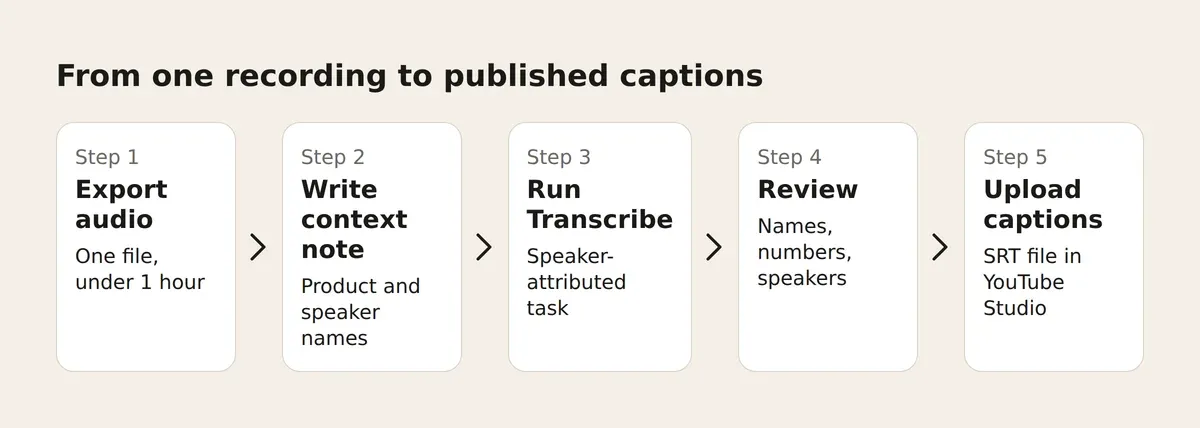
To get a speaker-labeled transcript from a recorded episode with Nemotron 3.5 Transcribe:
- Save the recording as one audio file under 1 hour long. Split a longer episode into 2 files.
- Write a short context note with the product names, speaker names and acronyms used in the episode.
- Open the Nemotron 3.5 Transcribe demo on Hugging Face, or load the weights on your own machine with NeMo-Speech.cpp.
- Run the audio file with the context note and the speaker-attributed transcription task.
- Read the transcript against the audio for names, numbers and speaker changes.
- Save the text as show notes and, for video, as a caption file in SRT format.
To add that caption file to a video in YouTube Studio:
- Open "Subtitles" in the left menu and pick the video.
- Add the language, then click "ADD" under Subtitles.
- Select "Upload file".
- Choose "With timing" or "Without timing", then select "Continue".
- Choose the caption file to upload.
- Select "Save".
An SRT file already carries timestamps, so the "With timing" option is the one for a Nemotron 3.5 Transcribe export.[5]
How much does NVIDIA Nemotron 3.5 ASR cost?
Nemotron 3.5 ASR costs nothing to license: the weights of both models are free to download under the OpenMDW-1.1 license, for commercial or non-commercial use.[1]
- Your own GPU: Running Nemotron 3.5 Transcribe yourself needs GPU time, on your hardware or rented by the hour, and NVIDIA offers local deployment with NeMo-Speech.cpp alongside quantized versions that need less memory.[4]
- Hosted endpoints: Cloud inference providers such as DeepInfra host Nemotron 3.5 Transcribe as a pay-per-use API, which suits a team that transcribes a few hours a month and owns no GPU.[6]
- The cost that stays: Review time is the cost no model removes, so budget a human pass on names, numbers and speaker changes for every published transcript.
How does Nemotron 3.5 Transcribe compare with Whisper?
Nemotron 3.5 Transcribe and Whisper are both free, open speech-to-text models, and the difference is that Nemotron 3.5 Transcribe bundles speaker labels, 40-language coverage and vocabulary hints into one model.
- Whisper: Whisper is a general-purpose speech recognition model from OpenAI, released with its code and model weights under the MIT License.[7]
- Nemotron 3.5 Transcribe: Nemotron 3.5 Transcribe is the newer open-weights model, and NVIDIA reports it as the best open-weights model on the Open ASR Leaderboards.[3]
- Which to pick: Pick Whisper when you already run a Whisper pipeline and need plain transcripts, and pick Nemotron 3.5 Transcribe when you need speaker labels, 40-language coverage or vocabulary hints without extra tools.
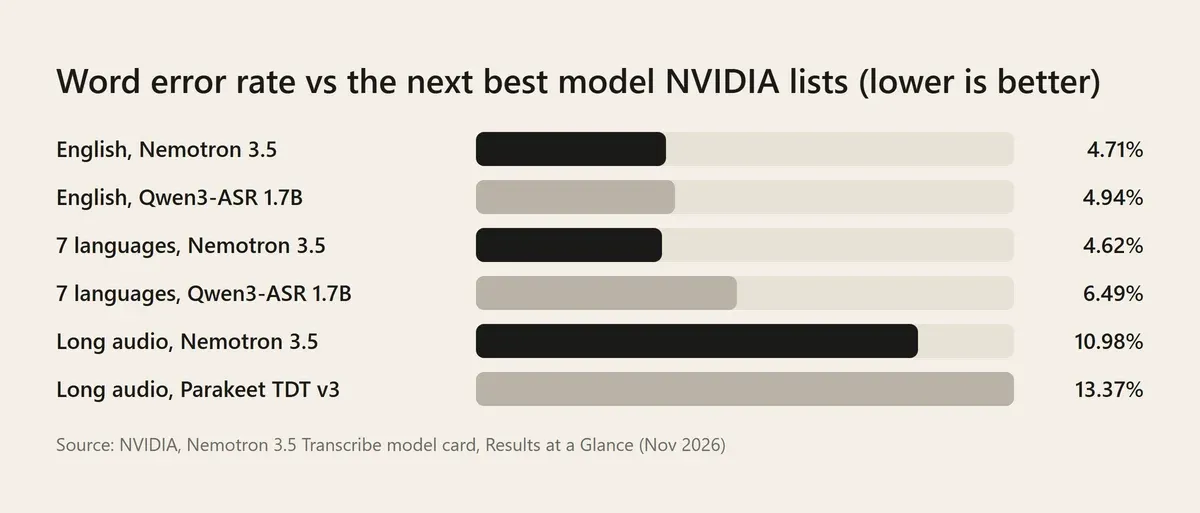
In NVIDIA's own comparison, Nemotron 3.5 Transcribe has a lower word error rate than the next best model it lists on all 3 benchmarks.[1] The English lead is small (4.71% against 4.94% for Qwen3-ASR 1.7B), and the real gaps are across 7 languages (4.62% against 6.49%) and on long recordings (10.98% against 13.37% for Parakeet TDT v3).
What do the benchmark numbers mean for marketers?
The benchmark numbers say Nemotron 3.5 Transcribe is close to word-perfect on clean, single-speaker audio and needs a human pass on meetings and noisy recordings.
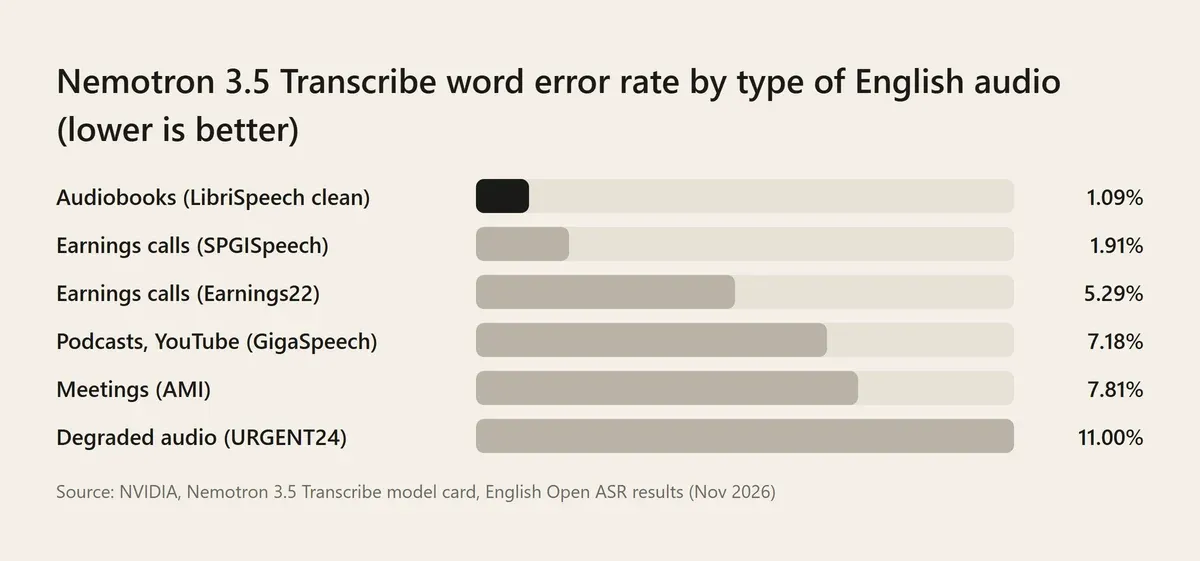
On clean audiobook speech the word error rate is 1.09%, about 1 wrong word in 90, and on podcast and YouTube audio it is 7.18%.[1] On recorded meetings it rises to 7.81%, and on degraded audio to 11.00%, roughly 1 wrong word in 9.
My read of these numbers, as an AI Marketing Specialist who plans content from recorded audio:
- Studio podcasts and webinars: Recordings with a good microphone sit near the clean end of NVIDIA's results, so expect a transcript that needs a skim, not a rewrite.
- Sales calls, panels and meetings: Meeting audio scores 7.81% and long recordings average 10.98%, so budget a real review pass before a quote from those transcripts goes into a post.
- Multilingual content: The 4.62% score across 7 languages, against 6.49% for the next model NVIDIA lists, is the strongest reason to try it for non-English captions.
- The microphone matters more than the model: The gap between clean audio (1.09%) and degraded audio (11.00%) is 10x, far larger than the gap between Nemotron 3.5 and any model in NVIDIA's comparison.
The figures above are NVIDIA's published benchmark results, not my own tests, so run 1 of your own recordings through Nemotron 3.5 Transcribe before you change a workflow.
What mistakes should you avoid with AI transcription?
The 3 mistakes below cost more time than the transcription itself.
- Skipping the context note: A run without your product names in the context returns misspelled brands, and NVIDIA's own advice for unfamiliar terms is to try context before training.[4]
- Publishing without review: A transcript with a wrong number in a customer quote is a correction waiting to happen, so a human reads every published transcript against the audio.
- Sending a 2-hour file: The maximum supported audio length for Nemotron 3.5 Transcribe is 1 hour, so split longer recordings before the run.[1]
What should marketers watch next?
Watch 2 things over the next month: hosted pricing, and how the transcription tools you already pay for respond.
- Hosted pricing: Pay-per-use endpoints for Nemotron 3.5 Transcribe set the real price of a transcript for a team with no GPU, so compare per-minute rates across providers before you commit a workflow.
- Your current vendor: Paid transcription tools now compete with a free model that labels speakers, so check whether your subscription's value is the editor and the integrations rather than the transcript.
Your first step
Your first step with NVIDIA Nemotron 3.5 ASR is to run one recorded episode through the Nemotron 3.5 Transcribe demo on Hugging Face with a context note of your product names, then count the fixes. If the transcript holds up, hand it to a drafting workflow such as the best Claude skills I ranked, so one recording becomes show notes, a blog draft and captions in the same week.
Resources and References Used for Research
- [1] nvidia/NVIDIA-Nemotron-3.5-Transcribe-30B-A4B - NVIDIA on Hugging Face (Nov 2026)
- [2] nvidia/nemotron-3.5-asr-streaming-0.6b - NVIDIA on Hugging Face (Nov 2026)
- [3] NVIDIA Nemotron 3.5 Transcribe: Intelligent Transcription with a Speech LLM - NVIDIA (Oct 2026)
- [4] NVIDIA Nemotron 3.5 Transcribe and Granary v2: Intelligent Multilingual Transcription You Can Prompt and Adapt - NVIDIA on Hugging Face (Oct 2026)
- [5] Add subtitles & captions - YouTube Help - Google (Nov 2026)
- [6] NVIDIA Nemotron 3.5 Transcribe 30B A4B API - Demo - DeepInfra - DeepInfra (Nov 2026)
- [7] GitHub - openai/whisper: Robust Speech Recognition via Large-Scale Weak Supervision - OpenAI on GitHub (Nov 2026)
Nemotron 3.5 ASR FAQs
Is Nemotron 3.5 Transcribe free to use?
Yes, Nemotron 3.5 Transcribe is free to download and use under the OpenMDW-1.1 license, which NVIDIA marks as ready for commercial or non-commercial use. The cost that remains is compute: a GPU of your own, cloud GPU hours or a hosted endpoint that charges per use. The Hugging Face demo lets you test a recording before you spend anything.
Which languages does Nemotron 3.5 ASR support?
Nemotron 3.5 Transcribe covers 40 languages for transcription, speech translation and spoken language identification, on recordings up to 1 hour long. The smaller Nemotron 3.5 ASR streaming model is also multilingual. Check each model's Hugging Face card for the exact language list before you plan a multilingual caption workflow, because coverage differs between the 2 models.
Does Nemotron 3.5 Transcribe work in real time?
No, Nemotron 3.5 Transcribe is built for recorded audio, not live streaming. For live captions at a virtual event, NVIDIA offers Nemotron 3.5 ASR streaming, a 0.6B-parameter model that processes audio in short chunks as it arrives. Use Transcribe for podcast episodes, webinar replays and video captions, and the streaming model only when the audio is live.
Can Nemotron 3.5 Transcribe tell speakers apart?
Yes, Nemotron 3.5 Transcribe labels up to 8 speakers in one recording through speaker-attributed transcription, so a panel webinar comes back with each line tagged. Speaker changes are still one of the 3 things to spot check against the audio, with names and numbers, before a transcript is published. The model card shows speakers as numbered tags, so you match each number to a name during review.
Is Nemotron 3.5 Transcribe better than Whisper?
Yes for most marketing jobs: Nemotron 3.5 Transcribe is the better pick when you need speaker labels, 40-language coverage or vocabulary hints in one open model, and NVIDIA reports it as the best open-weights model on the Open ASR Leaderboards. Whisper remains a solid free choice under the MIT License for plain transcripts in a pipeline you already run. The honest test is the same 10-minute recording through both, counting the fixes to names.
Do I need a GPU to run Nemotron 3.5 ASR?
No, you do not need your own GPU to try Nemotron 3.5 ASR: the Hugging Face demo and ModelScope Studios run Nemotron 3.5 Transcribe in the browser, and hosted inference providers charge per use. You need a GPU, owned or rented, to run the open weights yourself at volume, and the 0.6B streaming model needs far less hardware than the 30B-class Transcribe model. Local deployment with NeMo-Speech.cpp is the route for your own machine.