
Table of contents
Kiro vs Cursor compares 2 AI code editors that write code from plain-English prompts, and Kiro and Cursor can both plan a feature before building it. The main difference between Kiro and Cursor is how detailed the plan is: Kiro writes a spec of 3 documents, while Cursor's Plan Mode writes a single plan you can edit.[1]
My comparison covers what Kiro and Cursor are, Kiro specs vs Cursor's Plan Mode, AI models, pricing, marketing uses, and whether I recommend Kiro or Cursor for marketers.
Kiro vs Cursor at a glance
Kiro is an AI IDE (integrated development environment, the app where code is written and run) built around detailed specs. Cursor is an AI IDE built around its chat-based coding Agent.
The 4 differences between Kiro and Cursor that matter most are:
- Planning: Kiro's Spec workflow writes requirements, a design and a task list as 3 separate files, while Cursor's Plan Mode writes a single implementation plan that you edit before Cursor builds it.
- Extras: Kiro adds agent hooks that run actions automatically and steering files that hold your project rules. Cursor adds cloud agents that work on remote computers, and Cursor also runs in Slack and GitHub.
- Pricing: Kiro's paid plans cost $20 to $200 a month for a set number of credits. Cursor's paid plans cost $8 to $200 a month, and each higher Cursor plan includes more usage.
- My pick for marketers: I recommend Kiro for marketers whose work needs a manager's or developer's approval before it is built, and Cursor for marketers who build small things on their own.



Free AI Product Marketing Playbook to advance your career
Thanks. Your copy of the playbook is ready.
Download the PDFWhat is Kiro?
Kiro is an AI coding agent from AWS (Amazon Web Services) that plans, writes and changes code from plain-English prompts.
Kiro works in 5 places: the Kiro IDE, a CLI (a command-line tool), a web browser, a mobile app and Kiro Crew, an open-source workspace that runs on your own computer. The web and mobile versions of Kiro need a paid account.[2]
The Kiro IDE supports VS Code settings, VS Code themes and extensions from Open VSX (an open-source extension store), so a VS Code user can keep a familiar setup.
Kiro has 4 main features: specs, agent hooks, steering and MCP (Model Context Protocol).
- Specs: A Kiro spec is a written plan for a feature or a bug fix, saved as 3 files: requirements, a design and a task list.
- Agent hooks: A Kiro agent hook is an automatic action that runs when a set event happens, such as the agent changing a file, using a tool or finishing a task.[3]
- Steering: Kiro steering files are written instructions, such as your coding standards or brand rules, that Kiro follows automatically.
- MCP: Kiro supports MCP, an open standard for connecting AI tools to other apps. With MCP, Kiro can work with apps such as GitHub, Slack or a database, when the app offers an MCP server.

What is Cursor?
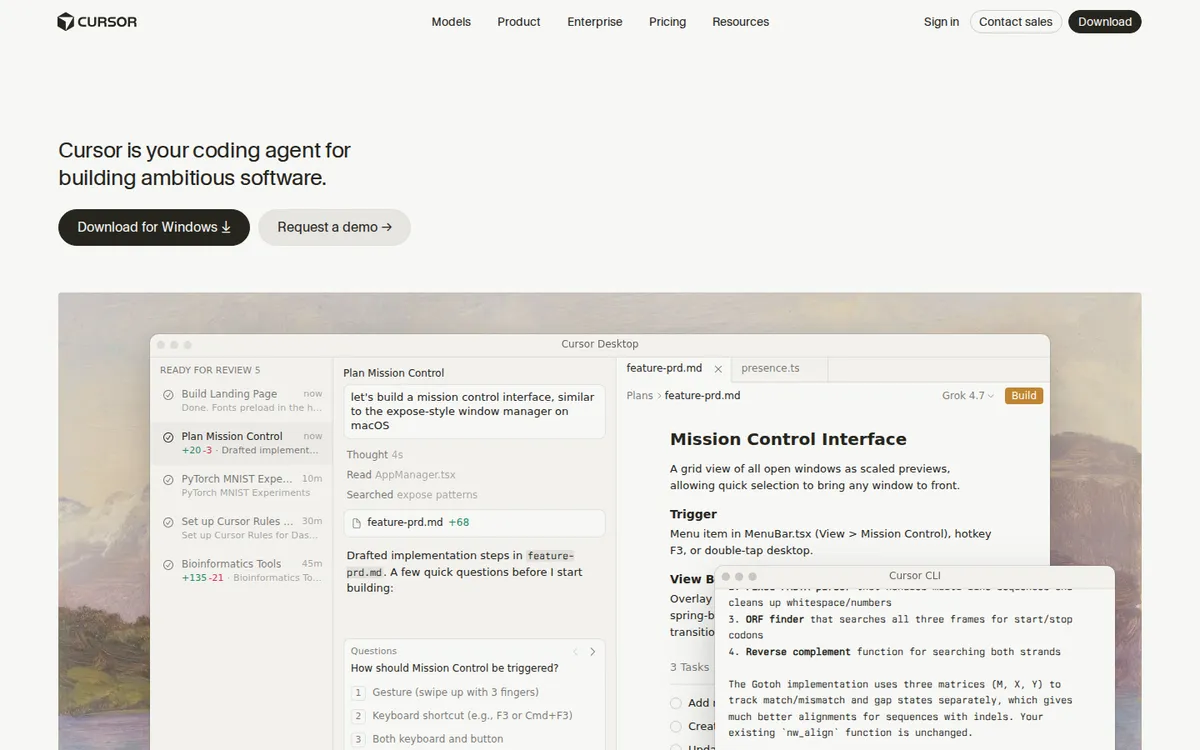
Cursor is an AI code editor from the company Anysphere. The Cursor Agent writes code, edits files and runs terminal commands (commands typed into the computer's text console) on its own.[4]
Cursor also works outside the editor: in your terminal, in Slack, and in GitHub, where Cursor reviews PRs (pull requests, proposed code changes).[5]
Cursor has 5 main features: the Agent, Plan Mode, cloud agents, Rules and Projects.
- Agent: The Cursor Agent is the chat assistant in Cursor's side panel that reads your project, edits files and runs terminal commands to finish the task you describe.
- Plan Mode: Cursor's Plan Mode asks you clarifying questions, researches your code and writes an implementation plan that you can edit. Cursor starts building only when you click to build the plan.[6]
- Cloud agents: Cursor cloud agents work on their own remote computers, where they build, test and demo a feature from start to finish, and you review the result.
- Rules: Cursor Rules are standing instructions for the Cursor Agent, such as coding standards or style rules, saved in a .cursor/rules folder or in one AGENTS.md file.[7]
- Projects: In Cursor Projects, a coordinator agent plans a large job and hands parts of the job to other agents.
What are the differences between Kiro and Cursor?
The main difference between Kiro and Cursor is the plan: a Kiro spec splits the plan into requirements, a design and tasks, while Cursor's Plan Mode writes a single implementation plan. The table below compares Kiro and Cursor on the 5 differences that matter most when you pick one:
| Kiro | Cursor | |
|---|---|---|
| Planning | Spec: requirements, design and tasks as 3 files | Plan Mode: a single implementation plan you can edit |
| Coding without a plan | The Default agent, through free-flow chat | Agent mode, the default |
| Project rules | Steering files | Rules files or one AGENTS.md file |
| Automation | Agent hooks that run on set events | Cloud agents that work on remote computers |
| Billing | Credits, used by each prompt | Plans with more usage at each higher price |
How does a Kiro spec differ from Cursor's Plan Mode?
A Kiro spec is a set of 3 planning documents that Kiro writes and tracks, while Cursor's Plan Mode writes a single plan before Cursor builds. Kiro and Cursor both also let you skip planning and write code straight from a chat.[8]
A Kiro spec moves through 3 phases, and each phase saves a file you can read and correct:
- Requirements: Kiro writes user stories (who needs the feature, and why) and acceptance criteria (the checks that prove the work is done), or a bug analysis when the spec is for a bug fix.[1]
- Design: Kiro writes a technical design that covers the system architecture, the components, the data flow, error handling and the testing plan.
- Tasks: Kiro turns the design into a task list with live status. Kiro can run a single task or all the tasks, with independent tasks running side by side in groups called waves.
Kiro's Quick Spec option writes all 3 spec documents without stopping for your approval, for features that are already well understood.
Cursor's Plan Mode asks clarifying questions, researches your code and writes a single implementation plan. You edit the Cursor plan in the chat or as a markdown file, then click to build.[6]
| Kiro spec | Cursor Plan Mode | |
|---|---|---|
| Starts with | Your prompt, turned into requirements | Clarifying questions about your prompt |
| Plan documents | 3 files: requirements, design and tasks | A single implementation plan |
| Approval | You approve each phase, or Quick Spec skips the approvals | You edit the plan, then click to build |
| While coding | Shows each task's status live | The Cursor Agent builds the plan |
Pick Kiro when a manager or developer must approve the plan before work starts, and pick Cursor when a single plan that you review on your own is enough.
Which AI models do Kiro and Cursor offer?
Kiro and Cursor both offer AI models from OpenAI and Anthropic, and Kiro and Cursor each have an Auto option that picks a model for you. The 4 model details that differ between Kiro and Cursor are:
- Kiro models: Kiro offers frontier models (the newest, most capable models) from OpenAI and Anthropic, and open-weight models (models whose files are public) from MiniMax, Zhipu AI, DeepSeek and Qwen.[9]
- Kiro Auto: Kiro Auto picks a model for each task and sets the 1x credit rate. Every other Kiro model costs a multiple of Auto's rate, so a 2x model uses twice the credits.
- Cursor models: Cursor offers models from OpenAI, Anthropic, Google, DeepSeek, Meta, Moonshot and Z.ai, plus Grok models and Cursor's own Composer models.[10]
- Cursor Auto: Cursor Auto has 3 modes, Cost, Balance and Intelligence, and Cursor's plans for one person include only Cost mode, while Balance and Intelligence are for Teams and Enterprise plans.
For marketing tasks like page edits and small scripts, I would start with Kiro Auto or Cursor Auto, because small tasks rarely need the most expensive model.
How do Kiro vs Cursor pricing and limits compare?
Kiro has a Free plan and 4 paid plans from $20 to $200 a month. Cursor has a Free plan and 4 paid plans for one person from $8 to $200 a month.
The 4 pricing facts that matter for a marketing budget are:
- Kiro credits: A Kiro credit is Kiro's unit of AI work: each prompt you send uses credits, and the AI model you pick changes how many credits the prompt uses.[11]
- Kiro plans: Kiro Free includes 50 credits with no time limit, and Kiro's paid plans, Pro, Pro+, Pro Max and Power, include 1,000 to 10,000 credits a month.
- Cursor plans: Cursor's plans for one person are Free, Plus, Premium, Super and Ultra, and Cursor recommends its Teams plan for people who work with others.[12]
- Cursor usage: Each higher Cursor plan includes more usage than Plus: 4x on Premium, 15x on Super and 50x on Ultra.
| Kiro (per user, per month) | Cursor (per month) | |
|---|---|---|
| Free | $0, 50 credits | $0, limited usage |
| Entry plan | Pro, $20, 1,000 credits | Plus, $8, basic usage |
| Second plan | Pro+, $40, 2,000 credits | Premium, $30, 4x the usage of Plus |
| Third plan | Pro Max, $100, 5,000 credits | Super, $100, 15x the usage of Plus |
| Top plan | Power, $200, 10,000 credits | Ultra, $200, 50x the usage of Plus |
The prices above come from the Kiro pricing page and the Cursor pricing page, checked on November 3, 2026.
Kiro and Cursor change their prices and limits often, so check the Kiro and Cursor pricing pages before you buy, and estimate how much usage a normal month of your work needs.
How can marketers use Kiro and Cursor?
Marketers can use Kiro and Cursor to do 4 jobs that usually need a developer: build landing pages, write scripts and automations, build SEO and analytics tools, and run content workflows.
I am an AI Marketing Specialist with 2+ years of multi-channel marketing experience, and the uses below come from Kiro's and Cursor's official docs, not from my own hands-on test.
Landing pages
For landing pages, use Kiro when a manager must approve the page plan first, and use Cursor when you edit and publish the page on your own.
- Kiro for a page that needs approval: You can use a Kiro spec to plan a new landing page, with the sections, form fields and tracking written as acceptance criteria. Your manager approves the acceptance criteria before Kiro writes any code.
- Cursor for a quick page edit: You can use the Cursor Agent to change a headline, swap an image or fix a form field on a page that already exists, then review the change and publish it.
Scripts and automations
For scripts and automations, Kiro offers agent hooks and MCP connections, and Cursor offers an Agent that writes, runs and fixes code in the terminal.
- Kiro agent hooks: You can use a Kiro agent hook to run an automatic check whenever Kiro changes a file, for example a check that every new page has a meta description.
- Kiro MCP connections: You can use Kiro's MCP support to connect Kiro to a marketing tool, such as HubSpot, Google Ads or Google Sheets, when that tool offers an MCP server.
- Cursor Agent and terminal: You can use the Cursor Agent to write a Python or JavaScript script, run the script in the terminal and fix any errors, all in one chat.
SEO and analytics tooling
For SEO and analytics work, use Kiro when an internal tool needs careful planning, and use Cursor for a quick one-off script.
- Kiro specs for internal tools: You can use a Kiro spec to build a small internal tool, such as a keyword clustering script (a script that groups similar keywords) or a ranking-change report. The Kiro requirements file is where you agree on the metrics and data sources before any code exists.
- Cursor for one-off analysis: You can use Cursor to write a script that reads a Google Search Console export, removes duplicate queries and lists the pages that lost clicks. You can rerun the same script every month.
- Where AI visibility fits: Tracking how ChatGPT, Perplexity and Gemini mention your brand needs an AI visibility tool rather than a code editor like Kiro or Cursor. My guide to the best AI visibility tools compares the leading tools for checking your brand's visibility in AI answers.
Content workflows
For content workflows, the most useful feature in Kiro and Cursor is the instruction file: steering files in Kiro, and Rules or an AGENTS.md file in Cursor.
- Kiro steering for content rules: You can use Kiro steering files to give Kiro your style guide, so every content template and publishing checklist Kiro builds follows the same rules.
- Cursor Rules and AGENTS.md: You can use a Cursor Rules file or an AGENTS.md file to give the Cursor Agent your tone of voice, banned words and formatting rules.
- Reusable instructions: Kiro steering files and Cursor Rules are similar to agent skills, which are instruction files that teach an AI agent a complete task. My guide to Claude skills explains how to write an agent skill.
Which one should marketers pick?
I recommend Kiro for most marketers, because a Kiro spec turns a rough request into written requirements that a manager, designer or developer can check before any code exists.
A Kiro requirements file reads like a campaign brief, with user stories that say who the work is for and acceptance criteria that say when the work is done. A marketer who reviews campaign briefs already knows how to review a Kiro requirements file.
I recommend Cursor when you are the only person who reviews the work, because the Cursor Agent can plan and build from one chat. Cursor cloud agents can also finish a longer job while you do other work.
Kiro and Cursor both have free plans, so you can test Kiro and Cursor on a real task, such as a landing page, before you pay.
My recommendation is based on Kiro's and Cursor's official docs and pricing pages, not on my own test. Let a test on one real marketing task, such as a landing page or a report script, make the final decision.
What mistakes should you avoid when choosing between Kiro and Cursor?
Avoid 3 mistakes when you choose between Kiro and Cursor: comparing only the prices, skipping the instruction files, and ignoring where Kiro and Cursor work.
- Comparing only prices: Kiro charges in credits and Cursor charges in usage, so the monthly price alone does not show whether Kiro or Cursor costs less for your work. Run a few real tasks on the Kiro and Cursor free plans, and compare the Kiro credits with the Cursor usage.
- Skipping steering and Rules: Without a Kiro steering file or a Cursor Rules file, Kiro and Cursor do not know your standards, such as brand terms or code style. Write the instruction file on day one.
- Ignoring where Kiro and Cursor work: Kiro also works in a terminal, a web browser and a mobile app, and Cursor also works in Slack and GitHub. Pick Cursor if your team works in Slack and GitHub, and Kiro if your team wants a mobile app or a browser version.
Conclusion
Kiro is the better pick when your work needs a detailed plan that other people approve. Cursor is the better pick when you work alone and want to go from prompt to code in one chat.
To choose between Kiro and Cursor, run one real marketing task, such as a landing page or a report script, on both free plans. Keep Kiro or Cursor, whichever one produced a result you could hand to a colleague.
If you want help deciding how AI agents fit your marketing work, you can book a call with me, and we will compare Kiro and Cursor against your workflow.
Resources and References Used for Research
- [1] Specs - Features - Docs - Kiro - Kiro (AWS) (Nov 2026)
- [2] Kiro: Move beyond AI coding to agentic engineering - Kiro (AWS) (Nov 2026)
- [3] Docs - Kiro - Kiro (AWS) (Nov 2026)
- [4] Cursor Agent | Cursor Docs - Cursor (Anysphere) (Nov 2026)
- [5] AI Coding Agent for Building Ambitious Software | Cursor - Cursor (Anysphere) (Nov 2026)
- [6] Plan Mode | Cursor Docs - Cursor (Anysphere) (Nov 2026)
- [7] Rules | Cursor Docs - Cursor (Anysphere) (Nov 2026)
- [8] Chat - IDE 1.x - Docs - Kiro - Kiro (AWS) (Nov 2026)
- [9] Models - Docs - Kiro - Kiro (AWS) (Nov 2026)
- [10] Models & Pricing | Cursor Docs - Cursor (Anysphere) (Nov 2026)
- [11] Pricing - Kiro - Kiro (AWS) (Nov 2026)
- [12] Pricing | Cursor - Cursor (Anysphere) (Nov 2026)
Kiro vs Cursor FAQs
Is Kiro better than Cursor for marketers?
No, Kiro is not better than Cursor for every marketer. Kiro is the better pick when a landing page or script needs a detailed plan that a manager or developer approves first, because a Kiro spec writes requirements, a design and a task list before any code. Cursor is the better pick when you review your own work and want the Cursor Agent to plan and build from one chat.
Is Kiro free to use?
Yes, Kiro has a Free plan with no time limit that includes 50 credits, and each prompt you send to Kiro uses credits. Kiro's paid plans are Pro at $20, Pro+ at $40, Pro Max at $100 and Power at $200 per user per month, with 1,000 to 10,000 credits. The AI model you choose changes how many credits each prompt uses.
Does Cursor have a free plan?
Yes, Cursor has a Free plan with limited usage, and Cursor's 4 paid plans for one person are Plus at $8, Premium at $30, Super at $100 and Ultra at $200 a month. Each higher Cursor plan includes more usage than Plus, from 4x on Premium to 50x on Ultra. Cursor also sells Teams and Enterprise plans for companies.
Does Cursor have a planning mode like Kiro's specs?
Yes, Cursor has Plan Mode, which asks clarifying questions, researches your code and writes an implementation plan before any code is written. You can edit the Cursor plan in the chat or as a markdown file, and Cursor builds the plan only when you click to build. A Kiro spec goes further, with separate requirements, design and task files.
Can Kiro use VS Code extensions?
Yes, the Kiro IDE supports VS Code settings, VS Code themes and extensions from Open VSX, an open-source extension store, so a VS Code user can keep a familiar setup. Open VSX is separate from Microsoft's Visual Studio Marketplace, so check that each extension you rely on is listed on Open VSX before you switch editors.
What is spec-driven development in Kiro?
Spec-driven development in Kiro means Kiro writes a spec, a written plan, before Kiro writes any code. A Kiro spec has 3 parts: requirements that say what the feature must do, a technical design, and a task list with live status. Kiro then builds the code task by task, or runs groups of independent tasks side by side, while you review the changes.
Can a marketer with no coding background use Kiro or Cursor?
Yes, a marketer with no coding background can use Kiro or Cursor, because Kiro and Cursor both write the code from plain-English prompts. A Kiro requirements file reads like a campaign brief that you can correct before any code is written. In Cursor, you describe the task to the Cursor Agent, review the change the Agent makes and ask for fixes in the same chat.